Quick Start
This guide will help you quickly get started using SpinQLab Link for quantum experiments.
Basic Concepts
Connection Management
SpinQLab Link uses TCP protocol to communicate with experimental equipment. Each connection requires:
Host address: IP address of the experimental equipment
Port: Communication port, usually 8181
Account: Login username
Password: Login password
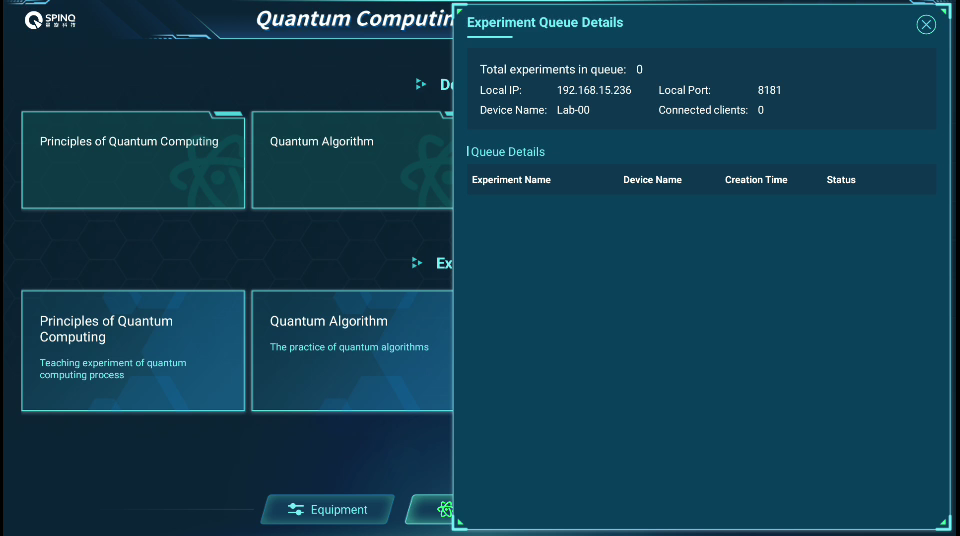
SpinQLab Link Device Information
The connection process is as follows:
Enter the experimental interface-》Click the total actual queue in the upper right corner
Get the device IP address and port number
Note
Make sure your network environment has access to laboratory equipment. If you are in a corporate network environment, you may need to configure firewall rules to allow traffic on TCP port 8181.
Experiment Types
SpinQLab Link supports multiple types of quantum experiments, which are defined through the experimentType enumeration:
Basic Experiments: NMR Phenomena, Rabi Oscillations, Qubits, etc.
Decoherence Experiments: T₁, T₂ Relaxation Time Measurements
Quantum Control: Quantum Gates, Quantum Circuits
Quantum Algorithms: Implementation of Deutsch, Grover, VQE and other algorithms
the first experiment
Let’s start with the simplest NMR pulse experiment:
Step 1: Import the library
from spinqlablink import SpinQLabLink, ExperimentType, Pulse, print_graph
Step 2: Establish a connection
# Create connection instance
spinqlablink = SpinQLabLink(
    host="192.168.9.121",    # Device IP address (from experiment interface)
    port=8181,               # Communication port (from experiment interface)
    account="username",      # Username (any input)
    password="password"      # Password (any input)
)

# Connect to device
spinqlablink.connect()

# Wait for login to complete
if not spinqlablink.wait_for_login():
    print("Login failed")
    return

print("Connection successful!")
Step 3: Register for the experiment
# Register NMR pulse experiment
experiment, parameters = spinqlablink.register_experiment(
    ExperimentType.NMR_PHENOMENON_AND_SIGNAL
)

print(f"Experiment registered, ID: {experiment.id}")
Step 4: Set parameters
# Create a 90-degree pulse
pulse_90 = Pulse(
    path=0,          # Hydrogen channel (0=hydrogen, 1=phosphorus)
    width=40,        # 40 microseconds width
    amplitude=100,   # 100% amplitude
    phase=90,        # 90 degrees phase
    detuning=0       # No detuning
)

# Set experiment parameters
parameters.pulses = [pulse_90]
parameters.freq_h = 27.852105    # Hydrogen resonance frequency (MHz)
parameters.freq_p = 11.322872    # Phosphorus resonance frequency (MHz)
parameters.makePps = True        # Generate PPS signal (True=generate PPS signal, False=don't generate PPS signal)
parameters.samplePath = 0        # Sampling path: hydrogen channel
parameters.custom_freq = False   # Use device lock frequency (True=use the input freq_h,freq_p, False=use device lock frequency)
print("✓ Parameters set")
Step 5: Run the experiment
# Run the experiment
spinqlablink.run_experiment()
print("Experiment started...")

# Wait for experiment completion
spinqlablink.wait_for_experiment_completion()
print("Experiment completed!")
Step 6: Get results and clean up resources
# Get experiment result
result = spinqlablink.get_experiment_result()

# Clean up and disconnect
spinqlablink.deregister_experiment()
spinqlablink.disconnect()

# Display the results
if "result" in result:
    exp_result = result["result"]
    for key, value in exp_result.items():
        if key != "graph":
            print(f"{key}: {value}")
    print_graph(result["result"])
else:
    print("Experiment failed")
Note
If the returned data is normal, the window shown in the figure will appear.
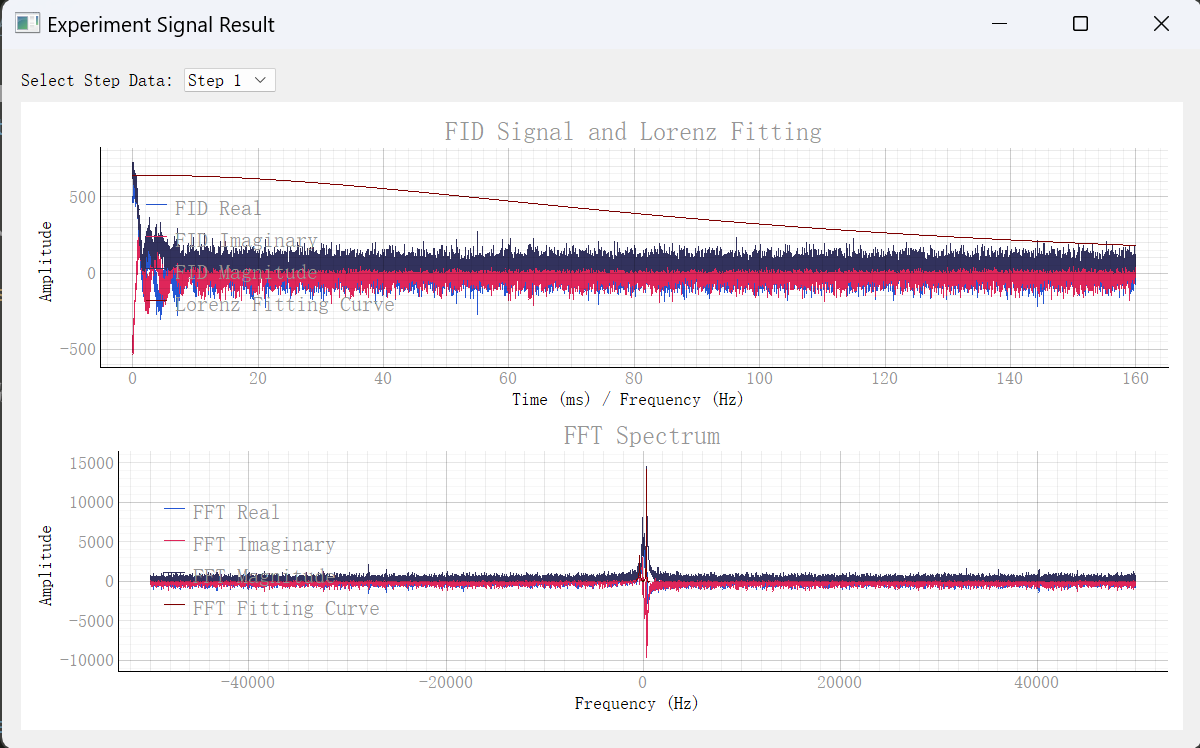
SpinQLab Link experimental results
complete example
Combine the above steps into a complete script:
from spinqlablink import SpinQLabLink, ExperimentType, Pulse, print_graph

def main():
    # Create connection instance
    spinqlablink = SpinQLabLink("192.168.15.203", 8181, "username", "password")
    spinqlablink.connect()

    if not spinqlablink.wait_for_login():
        print("Login failed")
        return

    print("✓ Connection successful")

    # Register NMR pulse experiment
    experiment, parameters = spinqlablink.register_experiment(
        ExperimentType.NMR_PHENOMENON_AND_SIGNAL
    )

    print(f"✓ Experiment registered: {experiment.id}")

    # Set experiment parameters
    parameters.pulses = [Pulse(path=0, width=40, amplitude=100, phase=90, detuning=0)]
    parameters.freq_h = 37.852105
    parameters.freq_p = 15.322872
    parameters.makePps = True
    parameters.samplePath = 0
    parameters.custom_freq = False
    print("✓ Parameters set")

    # Run experiment
    spinqlablink.run_experiment()
    print("✓ Experiment started")

    # Wait for experiment completion
    spinqlablink.wait_for_experiment_completion()
    print("✓ Experiment completed")

    # Get experiment result
    result = spinqlablink.get_experiment_result()

    # Clean up and disconnect
    spinqlablink.deregister_experiment()
    spinqlablink.disconnect()

    # Display the results
    if "result" in result:
        exp_result = result["result"]
        for key, value in exp_result.items():
            if key != "graph":
                print(f"{key}: {value}")
        print_graph(result["result"])
    else:
        print("Experiment failed")

if __name__ == "__main__":
    main()
common pattern
error handling
try:
    spinqlablink.connect()
    # ... experiment code ...
except ConnectionError:
    print("Network connection error")
except TimeoutError:
    print("Operation timeout")
except Exception as e:
    print(f"Unknown error: {e}")
finally:
    spinqlablink.disconnect()
parameter validation
# Check pulse parameter validity
def validate_pulse(pulse):
    assert 0 <= pulse.amplitude <= 100, "Amplitude must be between 0-100"
    assert pulse.width > 0, "Pulse width must be greater than 0"
    assert pulse.path in [0, 1], "Channel path must be 0 or 1"

pulse = Pulse(path=0, width=40, amplitude=100, phase=90, detuning=0)
validate_pulse(pulse)
next step
Now that you have mastered the basic usage, you can:
View Principles of Quantum Computing Learn more about the principles of quantum computing
View Quantum Algorithm Learn more algorithm experiments
View Comprehensive quantum technology experiment Learn more comprehensive experiments
View research experiment Learn more research experiments
Understand SpinQLab Link Package complete api for spinqlablink
common problems
Q: What if I fail to connect?
A: Check the network connection, IP address, port number and firewall settings.
Q: What is the reason for the experiment timeout?
A: It may be that the device is busy, the parameter is wrong, or the network is unstable. Try increasing the timeout or checking parameters.
Q: How to get more detailed debugging information?
For more help, please check the Contact us page.