Backend
SpinQit has five backend types: a basic classical simulator, a PyTorch-based simulator, local quantum computers from SpinQ, a cloud backend for accessing online quantum computing resources, and a QASM-based backend.
Basic Simulator
The basic simulator is a CPU-based local classical simulator. It supports measurement and conditional operations in the quantum circuit, but does not support autograd or parallel processing.
The code below shows how to use the basic classical simulator to run a quantum program. The configuration methods of BasicSimulatorConfig are also listed below.
engine = get_basic_simulator()
config = BasicSimulatorConfig()
config.configure_shots(1024)
result = engine.execute(exe, config)
- class spinqit.backend.BasicSimulatorConfig
Method |
Description |
|---|---|
configure_shots(shots) |
Configure the total number of shots so that the count of each possible binary reading is calculated in the result. |
configure_measure_qubits(mqubits) |
Configure the subset of qubits to measure so that only the result about these qubits will be measured. |
Each kind of backend in SpinQit has a get_value_and_grad_fn method that returns the evaluation result of an input quantum circuit and the corresponding grad function. This method is used by the QLayer interface of SpinQit which will be introduced later. This method has two important parameters, measure_op and grad_method, which specify the measurement in the evaluation and the type of grad function respectively.
The basic SpinQ simulator backend supports two types of gradient methods, parameter shift (“param_shift”) and adjoint differentiation (“adjoint_differentiation”). Both gradient methods work only with the “expval” measure operation, which means expectation value.
Torch Simulator
SpinQit includes another simulator based on PyTorch. This torch simulator supports autograd, and executes a quantum simulation in parallel on multiple CPU cores.
The code example shows how to use the torch simulator. The configuration methods of TorchSimulatorConfig are also listed below.
engine = get_torch_simulator()
config = TorchSimulatorConfig()
config.configure_num_thread(4)
result = engine.execute(exe, config)
- class spinqit.backend.TorchSimulatorConfig
Method |
Description |
|---|---|
configure_shots(shots) |
Configure the total number of shots so that the count of each possible binary reading is calculated in the result. |
configure_measure_qubits(mqubits) |
Configure the subset of qubits to measure so that only the result about these qubits will be measured. |
configure_num_thread(n_threads) |
Configure the number of threads to run the simulation. |
The Torch simulator backend supports two types of gradient methods, parameter shift (“param_shift”) and backpropagation (“backprop”). Parameter shift can work only with the “expval” measure operation, while backpropagation supports “expval” and “state”. Here, “state” refers to the state-vector result.
Local Quantum Computer
To use a local quantum computer from SpinQ, you first need to get the network information and register an account on the machine. Here Triangulum GUI is used as an example. For instructions on how to use other models, please contact our sales team.
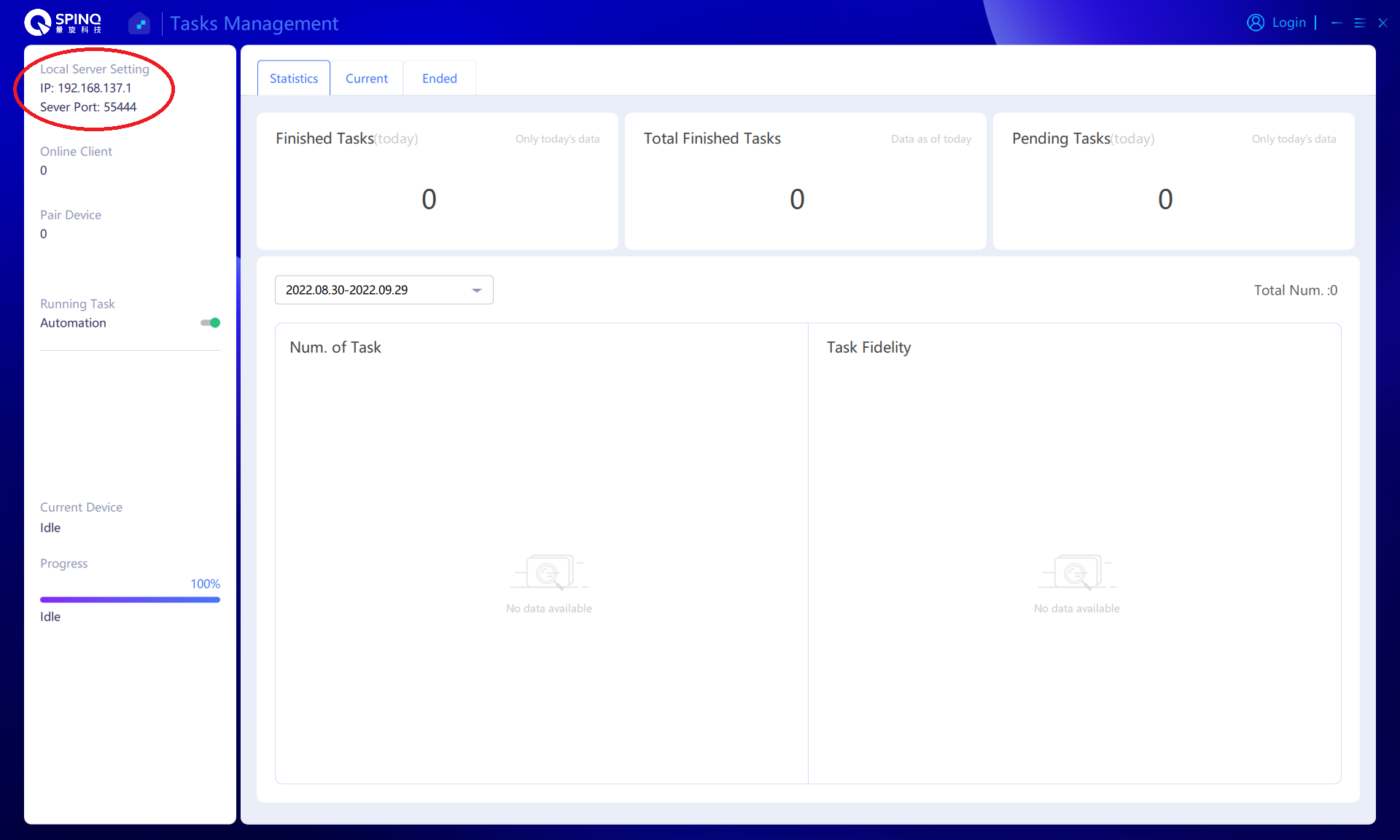
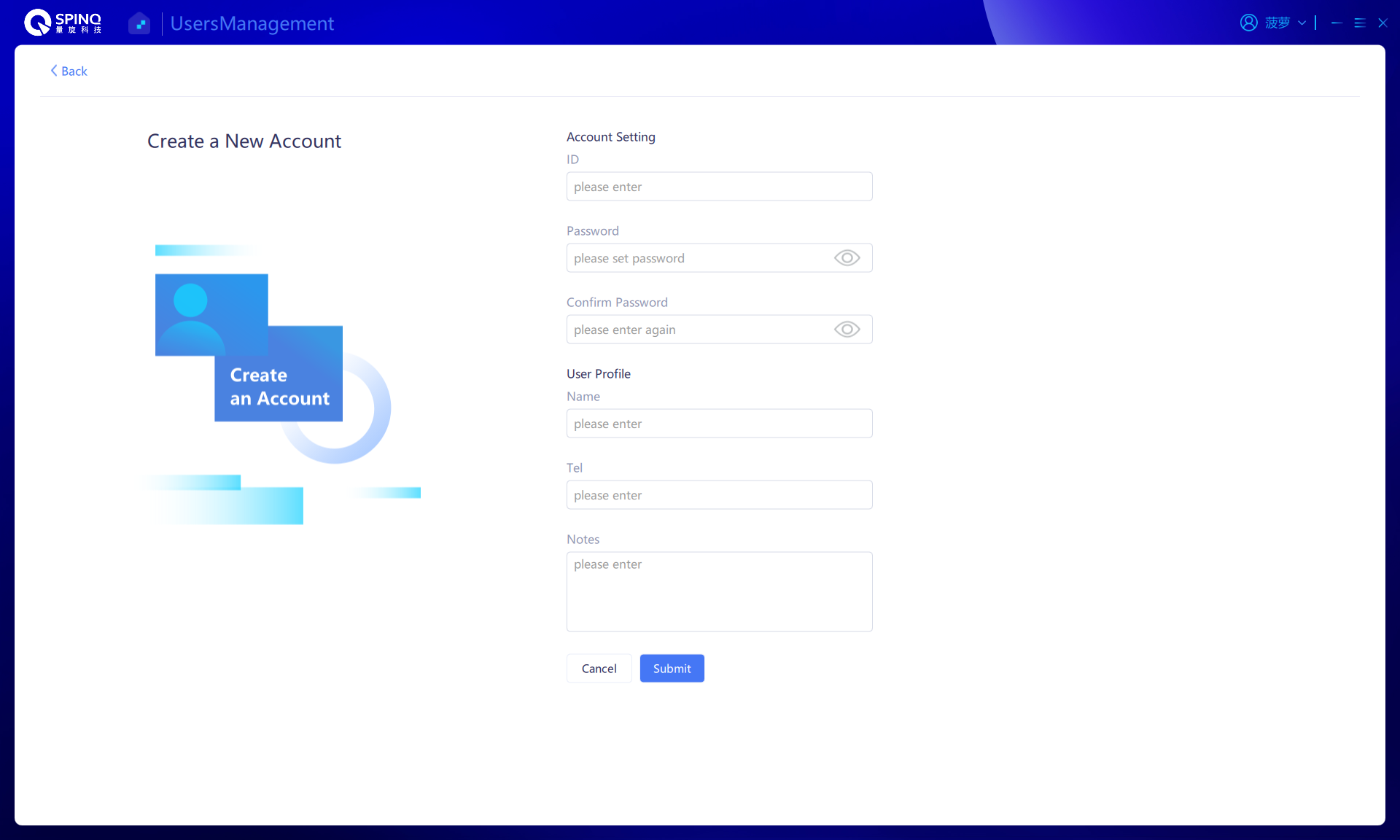
The code example shows how to use a local quantum computer backend in SpinQit. The configuration methods of NMRConfig are listed below.
engine = get_nmr()
config = NMRConfig()
config.configure_ip("192.168.137.1")
config.configure_port(55444)
config.configure_account("user9", "123456")
config.configure_task("task2", "Bell")
result = engine.execute(exe, config)
- class spinqit.backend.NMRConfig
Method |
Description |
|---|---|
configure_shots(shots) |
Configure the total number of shots so that the count of each possible binary reading is calculated in the result. |
configure_ip(addr) |
Configure the ip address of the quantum computer. |
configure_port(port) |
Configure the port number of the quantum computer. |
configure_account(username, password) |
Configure the username and password that registered on the quantum computer. |
configure_task(task_name, task_desc) |
Configure the task name and description. |
The local quantum computer backend supports only parameter shift (“param_shift”). Parameter shift works only with the “expval” measure operation.
Cloud
In order to use SpinQ’s online experimental platform, you have to first register and add a public SSH key on https://cloud.spinq.com. Please refer to the documentation online about SpinQ’s online experimental platform https://cloud.spinq.com/technical-docs?doc=cloud-guide. Username and key information are required to use the cloud backend. The host argument specifies the cloud platform URL to connect to. If it is omitted, the backend connects to SpinQ’s online experimental platform by default. It can also be set to the URL of a private cloud that supports SpinQit.
For example, use SpinQ’s online experimental platform by default as follows:
backend = get_spinq_cloud(username, keyfile)
To connect to a compatible private cloud, provide its URL through host:
backend = get_spinq_cloud(
    username,
    keyfile,
    host="https://private-cloud.example.com",
)
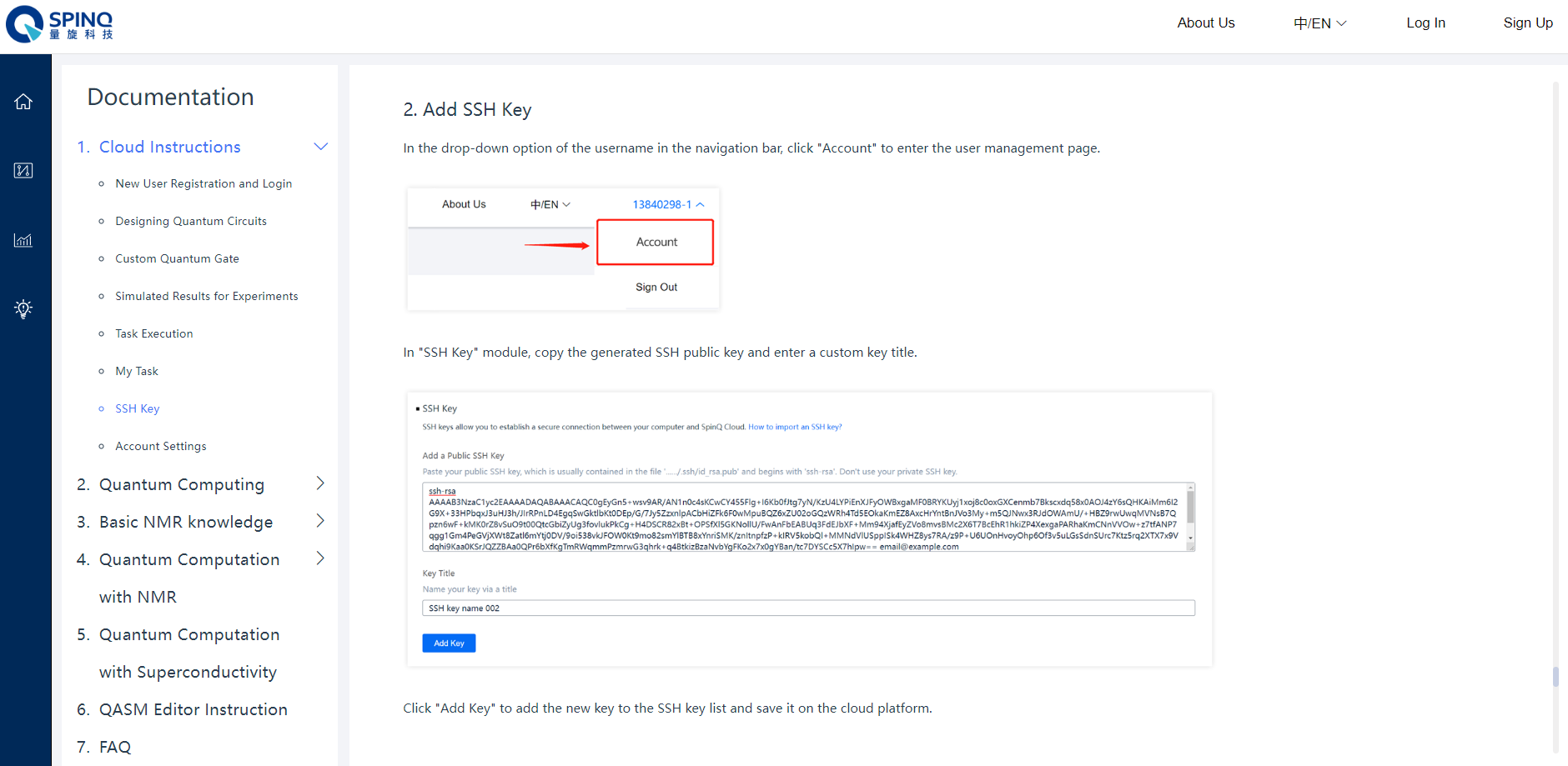 SpinQ provides multiple platforms with different numbers of qubits on SpinQ’s online experimental platform. The cloud backend has a
 get_platform method, which returns a platform instance for one of "gemini_vp", "triangulum_vp", or "superconductor_vp". These platforms have 2, 3, and 8 qubits, respectively, and support quantum programs with up to the corresponding number of qubits.
The cloud backend returns a SpinQCloudResult object. Its probabilities property contains a dictionary whose keys are binary measurement results and whose values are the corresponding probabilities. Its counts property contains shot counts when they are returned by the cloud platform; otherwise, counts can be derived from the probabilities and the configured number of shots. If shots are not configured, the default is 1024.
- class spinqit.backend.SpinQCloudConfig
Method |
Description |
|---|---|
configure_shots(shots) |
Configure the total number of shots so that the count of each possible binary reading is calculated in the result. |
configure_ip(addr) |
Configure the ip address of the quantum computer. |
configure_port(port) |
Configure the port number of the quantum computer. |
configure_account(username, password) |
Configure the username and password that registered on the quantum computer. |
configure_task(task_name, task_desc) |
Configure the task name and description. |
The following example shows how to use the cloud backend and log in using your SSH key.
username = "username"
keyfile = "/path/to/.ssh/id_rsa"

backend = get_spinq_cloud(username, keyfile)

gemini = backend.get_platform("gemini_vp")
print("gemini has " + str(gemini.machine_count) + " active machines.")

if gemini.available():
    comp = get_compiler("native")
    circ = Circuit()
    ...
    ir = comp.compile(circ, 0)
    config = SpinQCloudConfig()
    config.configure_platform('gemini_vp')
    config.configure_shots(1024)
    config.configure_task('newapitest1', 'newapi')

    res = backend.execute(ir, config)
else:
    print("No machine available for this platform.")
The cloud backend supports only parameter shift (“param_shift”). Parameter shift works only with the “expval” measure operation.
QASM
SpinQit can convert its intermediate representation to OpenQASM code in string form so that any third-party platform that supports OpenQASM can execute code written in SpinQit. The QASM backend is initialized with a handle function that runs OpenQASM code. The result format of this backend depends on the actual execution platform. It is best to convert third-party results to SpinQit result formats in the handle. SpinQit provides a QiskitQasmResult class to process Qiskit results.
The following example shows how to define a handle for the QASM backend to use Qiskit 2.3.0 and qiskit-aer 0.17.2 to execute a quantum circuit.
from qiskit import qasm2, transpile
from qiskit_aer import AerSimulator

from spinqit import (
    Circuit,
    H,
    CX,
    get_compiler,
    get_qasm_backend,
    QasmConfig,
    QiskitQasmResult,
)


def qiskit_function(qasm, shots=1024, *args, **kwargs):
    qc = qasm2.loads(qasm)

    print("Received OpenQASM:")
    print(qasm)

    simulator = AerSimulator(method="statevector")
    qc.save_statevector()
    qc = transpile(qc, simulator)

    aer_result = simulator.run(qc).result()
    statevector = aer_result.get_statevector(qc)

    result = QiskitQasmResult()
    result.set_result(
        getattr(statevector, "data", statevector),
        shots,
    )

    return result


circ = Circuit()
q = circ.allocateQubits(2)

circ << (H, q[0])
circ << (CX, (q[0], q[1]))

compiler = get_compiler("native")
exe = compiler.compile(circ, 0)

config = QasmConfig()
config.configure_shots(1024)

engine = get_qasm_backend(qiskit_function)
result = engine.execute(exe, config)

print("Probabilities:")
print(result.probabilities)

print("State vector:")
print(result.states)

print("Counts:")
print(result.counts)
The configuration methods of QasmConfig are listed below.
- class spinqit.backend.QasmConfig
Method |
Description |
|---|---|
configure_shots(shots) |
Configure the total number of shots so that the count of each possible binary reading is calculated in the result. |
configure_measure_qubits(mqubits) |
Configure the subset of qubits to measure so that only the result about these qubits will be measured. |
This QASM backend supports parameter shift (“param_shift”). It also supports adjoint differentiation (“adjoint_differentiation”) if the external QASM engine can return the state vector. Both gradient methods work only with the “expval” measure operation.